
The health and safety dashboard: one list of what needs attention
The first screen after you log in is a list of what is overdue, missing or coming up, worst first. Each line opens to show exactly which people, documents or actions it is counting.
14 days free, then from £9.99 a month, with no card needed to start.

“Are we covered?”
You, before anyone else gets the chance to ask
Every other question on this site is one somebody else puts to you. This is the one you ask yourself, and the dashboard answers it in the time it takes to read a short list.
One list, worst first
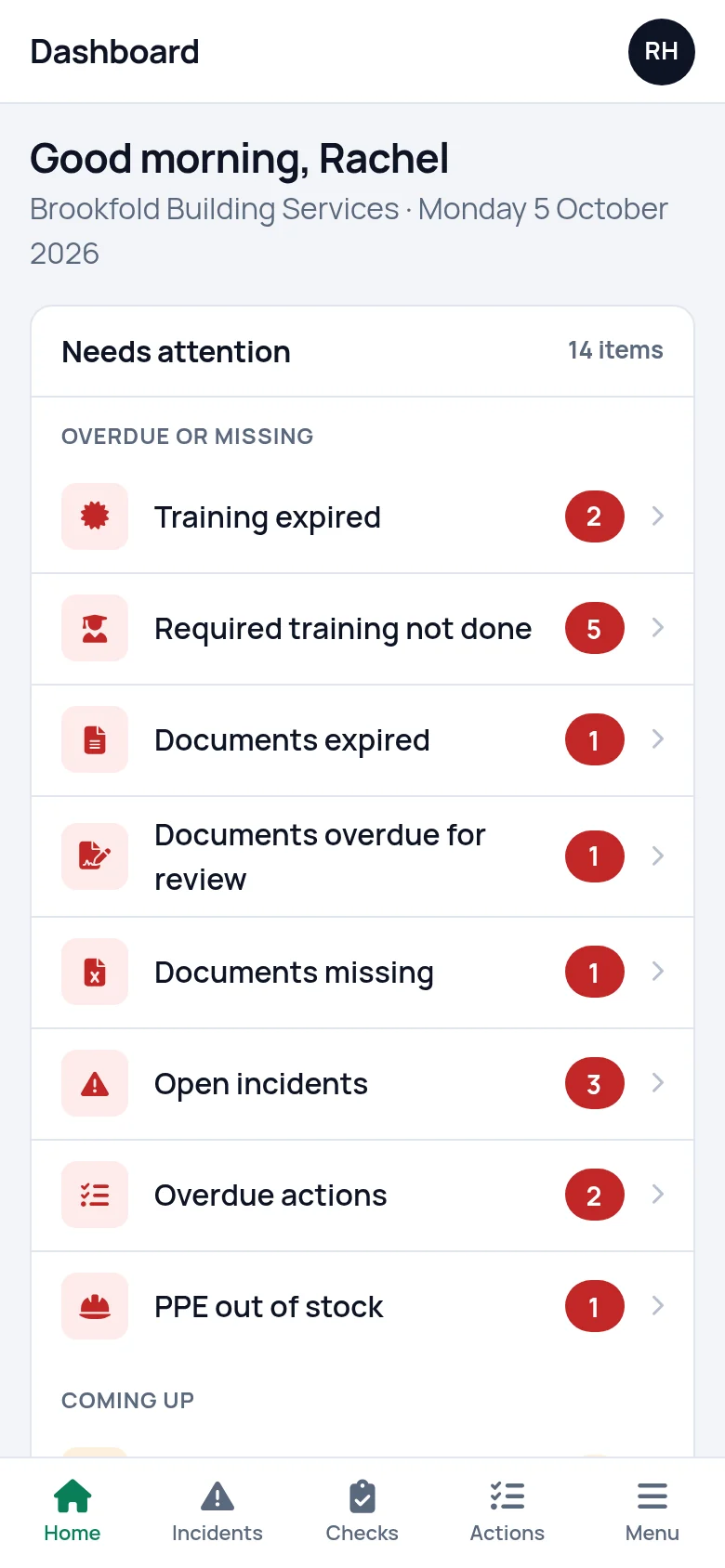
The dashboard opens on a panel called "Needs attention". It is a list in two groups. "Overdue or missing" comes first: things that are already wrong. "Coming up" follows: things that will be wrong soon, or are worth a look.
Each line is a plain description with a number beside it, such as "Training expired 2" or "Overdue actions 4". A line appears only when its number is above zero, so the list is as short as your records allow. When there is nothing to show, the panel reads "All clear. Nothing is overdue, missing or running low."
- Already wrong first, coming up second
- A line appears only when there is something in it
Every line that can appear
There are fifteen. The first eight belong to "Overdue or missing", the rest to "Coming up".
| Line | What it counts | Where it takes you |
|---|---|---|
| Training expired | Certificates past their expiry date, for current staff, counting each person's newest certificate for a course | Training records, Expired tab |
| Required training not done | Training that a current person's role makes mandatory, with nothing recorded for them | Training matrix |
| Documents expired | Documents past their expiry date | Documents |
| Documents overdue for review | Documents past their review date that have not expired | Documents |
| Documents missing | Documents on your required list with nothing uploaded | Document matrix |
| Open incidents | Incident reports that have not been closed | Incidents |
| Overdue actions | Open actions past their due date | Actions |
| PPE out of stock | PPE items with none left | PPE stock |
| Training expiring in 30 days | Certificates that run out within 30 days | Training records, Expiring tab |
| Documents expiring soon | Documents that expire within the next two months | Documents |
| Open actions not yet due | Open actions still inside their due date, or with no date | Actions |
| Latest checks with issues | Checklists whose most recent check had an answer of No or Fail. The line clears when the next check of that checklist passes | Inspections and checks |
| PPE low on stock | Items at or below their reorder or minimum level, but not at zero | PPE stock |
| Missed toolbox talks | People required at a talk that has been given who are not on its attendance list | Toolbox talks, Outstanding tab |
| Staff without a role | Current staff with no role, so no training is asked of them | Staff |
From a line to the names behind it
Tap any line and a panel opens with the items it is counting: the person and the course for expired training, the document and the date its review was due, the action and who it belongs to. You see who and what before you leave the dashboard.
"View all" at the foot of that panel takes you to the screen where it gets fixed. "Missed toolbox talks" lands on the Outstanding tab of toolbox talks, where each person can be marked as caught up. A check with issues opens that check itself, with every answer.

What counts as missing
"Documents missing" is worked out from the document matrix. You list the documents your business should hold, such as an insurance certificate or a fire risk assessment, and any with nothing uploaded against it is counted.
Training is worked out from roles in the same way. Each role lists the training it makes mandatory, and anyone in that role with nothing recorded for a course is counted under "Required training not done". The same gap pulls down the training compliance figure and shows on the training matrix as a question mark in that person's row.

Four figures and eight shortcuts
Beside the list, "At a glance" gives four figures: active staff, training compliance, open incidents and open actions. A figure takes a colour only when it is a problem.
Training compliance is the share of mandatory training that is in date for your current staff, the same sum the training matrix does. It turns amber below 90% and red below 70%. It is a count against the requirements you set, not a verdict on whether you meet the law.
Under the figures are shortcuts: report incident, run a check, record training, record toolbox talk, upload document, create action, add staff and PPE stock. Six of them open the form itself, so the form for a near miss is one tap from the dashboard.
The same list on a phone
On a phone the needs attention list comes first, then the four figures, then the shortcuts. Nothing is left out and nothing is moved to a menu.
That order is deliberate. Standing in the yard, the thing you want is what is wrong today. The thing you want next is the button to record what has happened.
What it does not do
- It does not send the list to you. There are no email or text alerts. The list is there when you log in, so it works for a firm that opens it on a regular day and does not for one that never does.
- It does not know when a check or a talk was due. Checks and toolbox talks are not scheduled automatically, so the dashboard flags a check that found a problem but cannot tell you that this week's check was never done.
- It does not export a PDF or a report. The dashboard is a screen. To show someone where you stand, show them the screen.
Questions people ask
What does the dashboard show first?
A list called Needs attention, in two groups. Overdue or missing covers expired training, expired or missing documents, documents overdue for review, open incidents, overdue actions and PPE that has run out. Coming up covers what expires soon, open actions, checks that found issues, low stock, missed toolbox talks and staff without a role.
How is training compliance worked out?
It counts every mandatory course required of every current member of staff through their roles, and works out what share of those is covered by a certificate that is in date. A certificate due to expire soon still counts. Optional courses are left out. With no requirements set, the figure reads 100%, so it only means something once your roles carry their training.
Does the dashboard show training that was never done?
Yes. "Required training not done" counts every piece of training that a person's role makes mandatory and that has nothing recorded for them, and opens a list of who and which course. Expired and expiring certificates have their own lines. Optional training is not counted.
How far ahead does it warn me?
Training is listed as expiring when it runs out within 30 days. Documents are listed as expiring soon when their expiry date falls within the next two months. Actions are listed as soon as they are open, and move to the overdue group once their due date has passed.
Can I choose what appears on the dashboard?
No. The list is the same for every account, and it sorts itself: a line shows only when there is something in it, and overdue or missing items always come before what is coming up. A part of the product you do not use never produces a line.
What does our safety consultant see?
The same dashboard, limited to what you have given them. If their access covers training and documents only, those are the only lines they get, and only for the sites you chose. A banner tells them whose account they are working in.
Have the answer ready before anyone asks.
Add your people, the training each role needs and the documents you hold. From then on, what is overdue or missing is on one screen.
14 days free, then from £9.99 a month, with no card needed to start.