
Toolbox talk software that records who was there
Record each talk with its date, its key points and the names of the people who heard it. Anyone who should have been there and was not stays on an outstanding list until they have caught up.
14 days free, then from £9.99 a month, with no card needed to start.

“Who was at the toolbox talk?”
A principal contractor, or your own insurer after a claim
A paper sign-off sheet answers it, if you can find the sheet. Here the talk, the date and the names are kept together and can be brought up on a phone.
Every talk, and whether everyone has had it
Each talk is a card. It shows the title, the date and time, how long the talk took, the topic, and two numbers: how many people attended and how many were required. A label in the corner says "All attended", or how many are outstanding, or "Scheduled" for a talk that has not happened yet.
Above the cards sit five figures: talks recorded, talks given this month, total attendances, average length and the number of people outstanding. Tap that last figure to see who they are.
The list can be narrowed to completed or scheduled talks. If your account has more than one site, each talk can be tied to a site and the list filtered by it.
Recording a talk while everyone is still standing there
The form asks for a title and for the date and time, which are set to now when you open it. You can add a description and the key points covered, one to a line. The duration starts at 15 minutes: change it, or clear it if nobody timed the talk.
The topic comes from a fixed list: manual handling, fire safety, PPE, slips, trips and falls, electrical safety, chemical safety, driving safety, working at height, housekeeping, process update, or other.
Then come two lists of names.
- Who should attend. Tick people one by one, or choose a role and press "Select all with this role" to take every labourer or every driver at once.
- Who attended. Press "Copy from required", then untick anyone who was not there.
It runs in the browser on the phone you already carry, so there is no toolbox talk app to install.
- Pick who needs the talk by role
- Copy the list, then untick the absentees
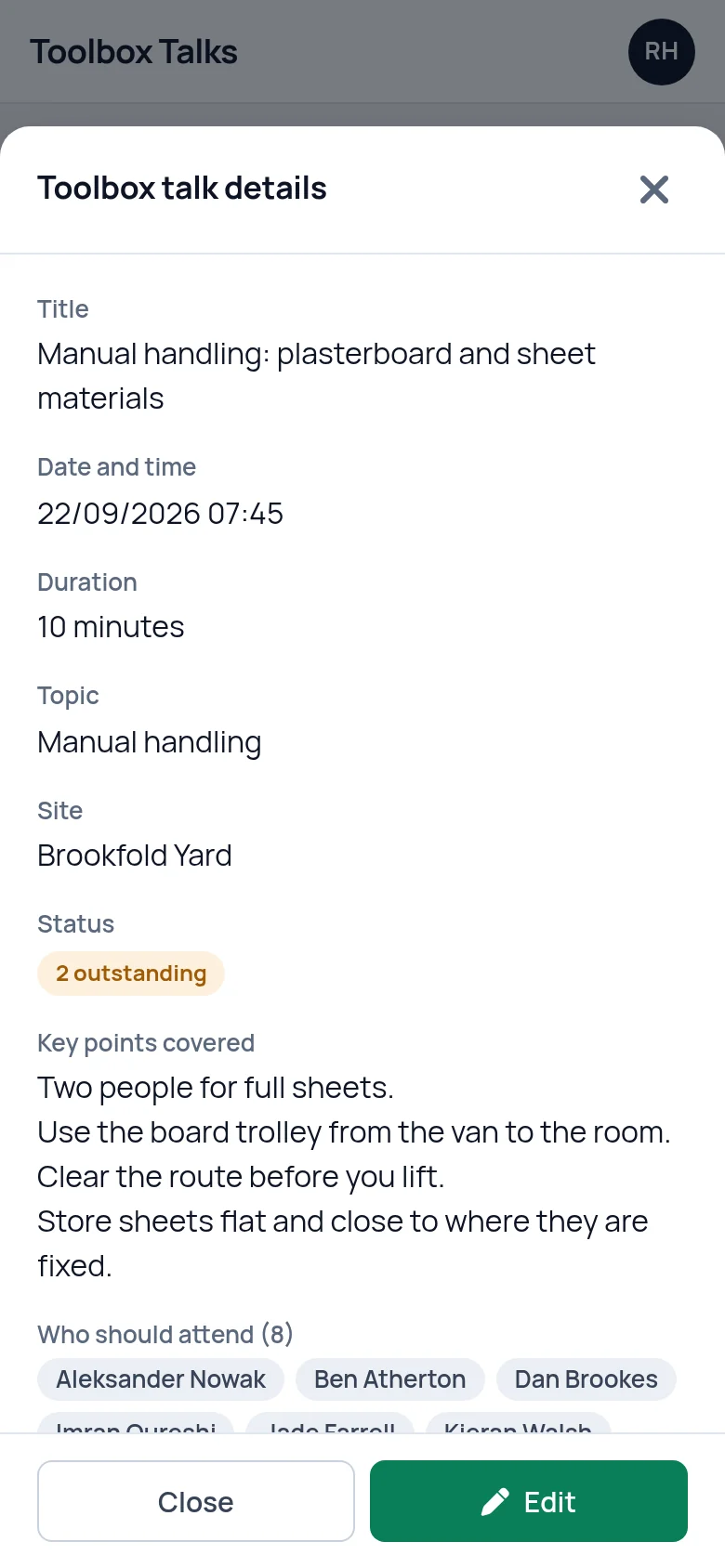
The record of one talk
Open a talk and the whole toolbox talk record is on one screen: title, date and time, duration, topic, the description, the key points, then the names. Who should attend, who attended and who is outstanding each carry a count.
This is the screen to put in front of a principal contractor or an insurer. It says what was covered, when, and who heard it.
If someone on the talk has since left the business, their name stays on the record with "(left)" beside it. Editing the talk later does not remove them. The Edit button on the same screen is there for correcting a detail or adding someone who was missed off.

The outstanding list
Anyone who was required at a talk that has been given, and is not on its attendance list, appears on the Outstanding tab with their name, the talk they missed and its date.
When you have been through it with them, press "Mark received". They are added to that talk's attendance and drop off the list, and the catch-up is noted in the activity log. When the last person is marked, the label on the talk's own card changes to "All attended".
The same number shows on your dashboard as "Missed toolbox talks", so it stays in front of you until it reaches zero. People who have left the business are not chased.
- One row for each person and each talk they missed
- Mark received once they have caught up
- The count sits on your dashboard

Talks planned for a future date
A talk saved with a date in the future is marked "Scheduled". You can set out in advance who should attend, and nobody counts as outstanding until the talk has been given.
Afterwards, open it, tick who attended and save. It becomes a completed talk like any other. Nothing repeats by itself: next month's talk is a new record.
If you are short of subjects, our guide lists a year of toolbox talk topics with what to say in each.
What it does not do
- It does not collect signatures. Attendance is ticked by whoever records the talk. If a client insists on signed sheets, keep a paper sheet as well. Our free record sheet will do.
- It does not generate QR codes. There is no code for people to scan to sign themselves in.
- It does not schedule talks for you. You can save a talk with a future date, but there is no repeating series and no reminder when the day comes.
- It does not give staff their own login. People cannot log in to read a talk or to confirm they were there.
Questions people ask
Can I record a toolbox talk on my phone?
Yes. SafetyPro360 runs in the web browser on any phone, so there is nothing to install from an app store. The form for recording a talk works on a small screen: title, date, key points, then tick boxes for who should attend and who did. It can be filled in on site, straight after the talk.
What counts as outstanding?
Someone is outstanding when they were ticked as required for a talk, the talk has been given, they are not on its attendance list and they still work for you. A scheduled talk has nobody outstanding until it has happened. People who have left the business are never listed.
How do I record someone who missed the talk and caught up later?
Go to the Outstanding tab, find their name against the talk and press Mark received once you have been through it with them. They are added to that talk's attendance list and come off the outstanding list. The count on the dashboard drops by one at the same time.
Does it come with toolbox talks ready to read out?
No. SafetyPro360 records the talks you give. It does not supply the words. Our guides include a year of toolbox talk topics and two complete talks you can read out, one on manual handling and one on working at height, and the key points you cover can be typed into the record.
Can people sign on the screen to confirm they attended?
No. There are no signatures in SafetyPro360. The person recording the talk ticks who was there, and the activity log shows who saved the record and when. If you need a signature from each person, use a paper sign-off sheet alongside and keep the two together.
What happens to a talk record when someone leaves?
Nothing is removed. A leaver who attended stays on the attendance list, shown as left. A leaver who was required and did not attend stays on the record too, but is no longer counted as outstanding, so you are not chased to brief someone who has gone.
Have the answer ready before anyone asks.
Add your people, the training each role needs and the documents you hold. From then on, what is overdue or missing is on one screen.
14 days free, then from £9.99 a month, with no card needed to start.