
Incident reporting software for accidents and near misses
An online accident book for a small firm. What happened is written down on the day, from a phone, and each report stays open until you close it.
14 days free, then from £9.99 a month, with no card needed to start.

“Where is your accident book?”
An HSE inspector, or a solicitor three years later
It gets asked after someone has been hurt, sometimes long after, when nobody remembers the details. The answer needs to be a dated report written at the time.
What goes in a report
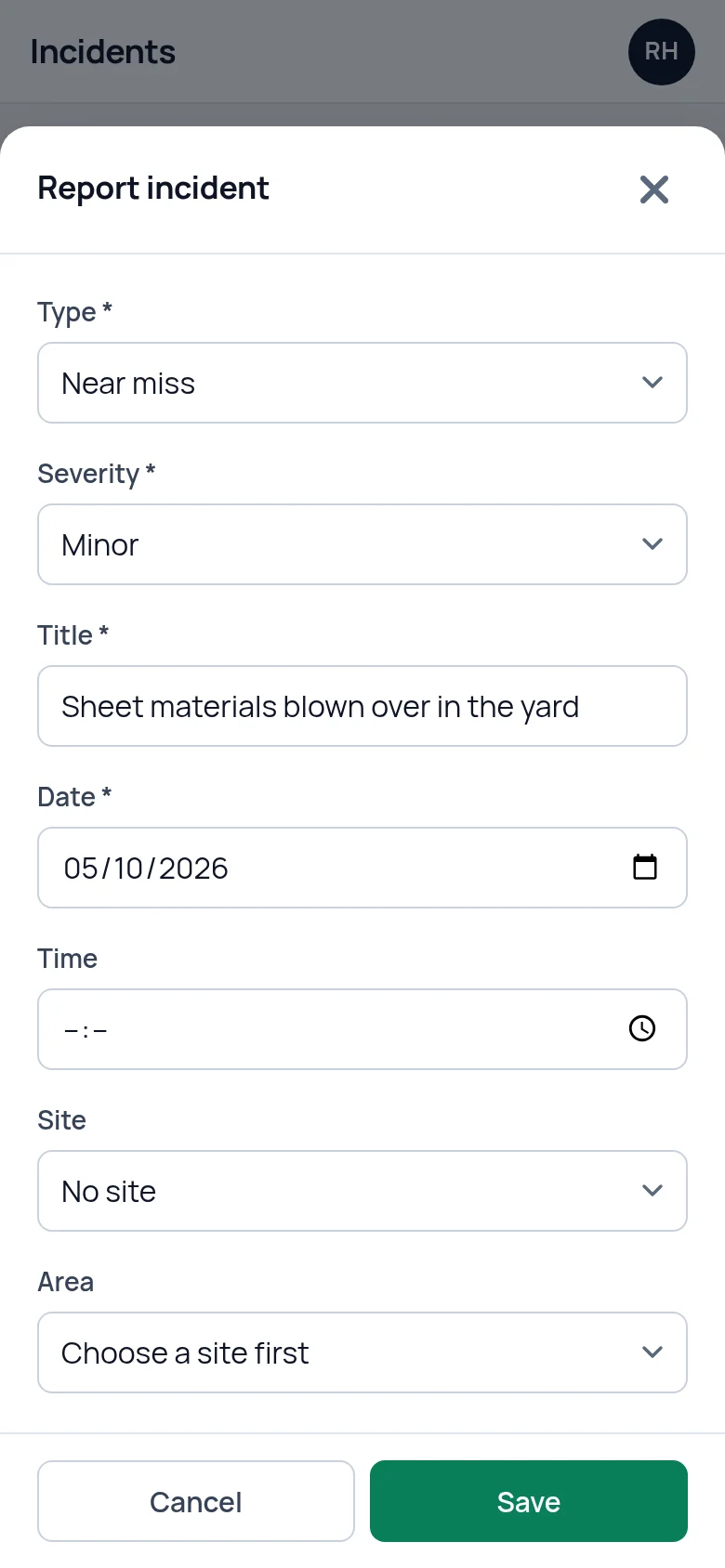
Press Report incident and the form asks for the things you will be asked about later. Four are required: the type, a title, the date and what happened. The rest you fill in as far as you know it.
- Type: accident, near miss, dangerous occurrence, environmental, property damage or other.
- Severity: minor, moderate, major or critical.
- When and where: the date and time, the site and area, and a line for exactly where, such as "Loading bay 2, by the roller door".
- Injury, if anyone was hurt: the person, picked from your staff list or typed in for a visitor or contractor. Then the kind of injury, whether first aid was given, whether they went to hospital, and the injury and treatment in your own words.
- Investigation: witnesses, what was done straight away and the root cause, if known.
Each report gets its own reference number when it is saved. The date cannot be set in the future.
- Four required fields, the rest when you know it
- The injured person can be staff, a visitor or a contractor
- A reference number on every report

Reported on a phone, while it is fresh
The form is the same on a phone as on a computer, set out in one column with the Save button always on screen. A near miss can be written up standing where it happened. Today's date is already filled in.
A report does not have to be finished in one go. Save what you know, then open it again to add the witnesses or the root cause when you have them.
Reports are entered by someone who is logged in. Agree who records an incident for the people on site who do not have a login.
Four statuses, from reported to closed
Every report carries one of four statuses: Reported, Investigating, Action required or Closed. A new report starts as Reported and you move it on by editing it.
Anything not yet Closed counts as open. The Incidents screen shows how many reports are open, how many incidents happened this month and what share have been closed, and the list can be filtered by type and by status. Open incidents are also counted on the dashboard under what needs attention, and they stay there until you close them.
Closing a report records the date and time it was closed. Reopen it and that is cleared.
The whole report on one read-only page
Press a report's title to read it without the risk of changing it. The view shows the status, severity and type, when and where it happened and what happened. Below that come the injury and the investigation, if anything was recorded under them, then when it was reported and when it was closed. Fields that were left empty are not shown.
This is the screen to have open when someone asks what happened. The Edit button on it opens the report for changes.

Who can delete a report
Only an account admin can delete an incident report. The app asks for confirmation first, because the report is removed for good. A safety consultant you have connected can add and edit reports but cannot delete them.
Reporting, editing and deleting are each written to the account's activity log with the name of the person and the time.
RIDDOR: what it does and where it stops
Some work-related injuries, diseases and dangerous occurrences have to be reported to HSE under RIDDOR. SafetyPro360 does not make that report and has no connection to HSE. You make a RIDDOR report yourself, on HSE's website.
What SafetyPro360 keeps is your own record of the incident, written at the time. That is what you will want in front of you when you fill in HSE's form. HSE lets you download a copy of the report you submit, and you can upload that copy to your document register so the two are held in the same account.
What it does not do
- It does not report to HSE. A RIDDOR report is made on HSE's website. SafetyPro360 holds your own record of the incident.
- It does not email or text anyone when a report is made. A new report shows on the Incidents screen and in the dashboard's count of open incidents the next time someone logs in.
- It does not have a public form or a QR code for staff to scan. A report is entered by someone logged in to your account.
- It does not export a report as a PDF, and a report has no photos or signatures on it. The report is read on screen. A photo can be uploaded to the document register with the report's reference in its title.
Questions people ask
Can SafetyPro360 replace a paper accident book?
It records who was hurt, when and where it happened, the injury and the treatment. The official accident book also asks for the injured person's address and occupation, and SafetyPro360 has no separate boxes for those, so type them into the report if you rely on it as your accident book. Our accident book guide covers who needs one and what an entry must contain.
Does it report incidents to HSE under RIDDOR?
No. SafetyPro360 keeps your own record of the incident and sends nothing to HSE. If an incident is reportable under RIDDOR, you report it on HSE's website. You can then upload the copy HSE lets you download, so your record and the report are held together.
Can staff report a near miss themselves?
Anyone with a login can report one from their phone. There is no public form or QR code, so people without a login tell someone who has one, and that person enters it. Agree who that is on each shift, so a near miss is written down on the day it happens.
Can a report be changed after it is saved?
Yes. Anyone who is allowed to edit can open a report and add to it or correct it, which is how witnesses and the root cause usually get added. The activity log records who edited a report and when. It does not keep the earlier wording.
Can I record an incident involving a visitor or a contractor?
Yes. The injured person can be picked from your staff list or, for anyone who is not on it, typed in by name. The rest of the report is the same: what happened, where, the injury, first aid, witnesses and what was done.
Who can see incident reports?
Anyone logged in to your account. If you connect an outside safety consultant and give them the Incidents screen, they see incidents at the sites you chose and incidents with no site against them. Only an account admin can delete a report.
Have the answer ready before anyone asks.
Add your people, the training each role needs and the documents you hold. From then on, what is overdue or missing is on one screen.
14 days free, then from £9.99 a month, with no card needed to start.