
Safety inspection software for your own checklists
Write a checklist for anything you inspect and run it on a phone, standing next to the thing. Every completed check is kept with its date, its score and each answer.
14 days free, then from £9.99 a month, with no card needed to start.

“When was that last checked?”
An inspector pointing at the forklift, the racking or the fire door
Most checks do get done. The trouble is the ones that leave nothing behind to show for it.
Build a checklist with your own questions
In the app this screen is called Monitoring. It holds two things: your checklists, and the record of every check done with them.
A checklist has a name, a description if you want one, a label for how often it is meant to be done (daily, weekly, monthly or as required) and as many questions as you need. Each question is given one of three kinds of answer:
- Yes / No
- Pass / Fail
- Written answer, for a reading, a name or a note
When the check is run, Yes / No and Pass / Fail questions also offer N/A, for the question that does not apply that day. A checklist cannot be saved with a blank question, or with no questions at all.
Each checklist appears as a card showing how often it is meant to be done, how many questions it has and how many checks have been done with it. Questions can be reworded, added or removed whenever the job changes.
You do not have to start from a blank page. Our free guides have complete checklists you can type in line by line, including the forklift daily checklist and the ladder inspection checklist.
- Your own questions, in your own words
- Three kinds of answer
- One checklist for each thing you inspect

Run the check on a phone, next to the thing
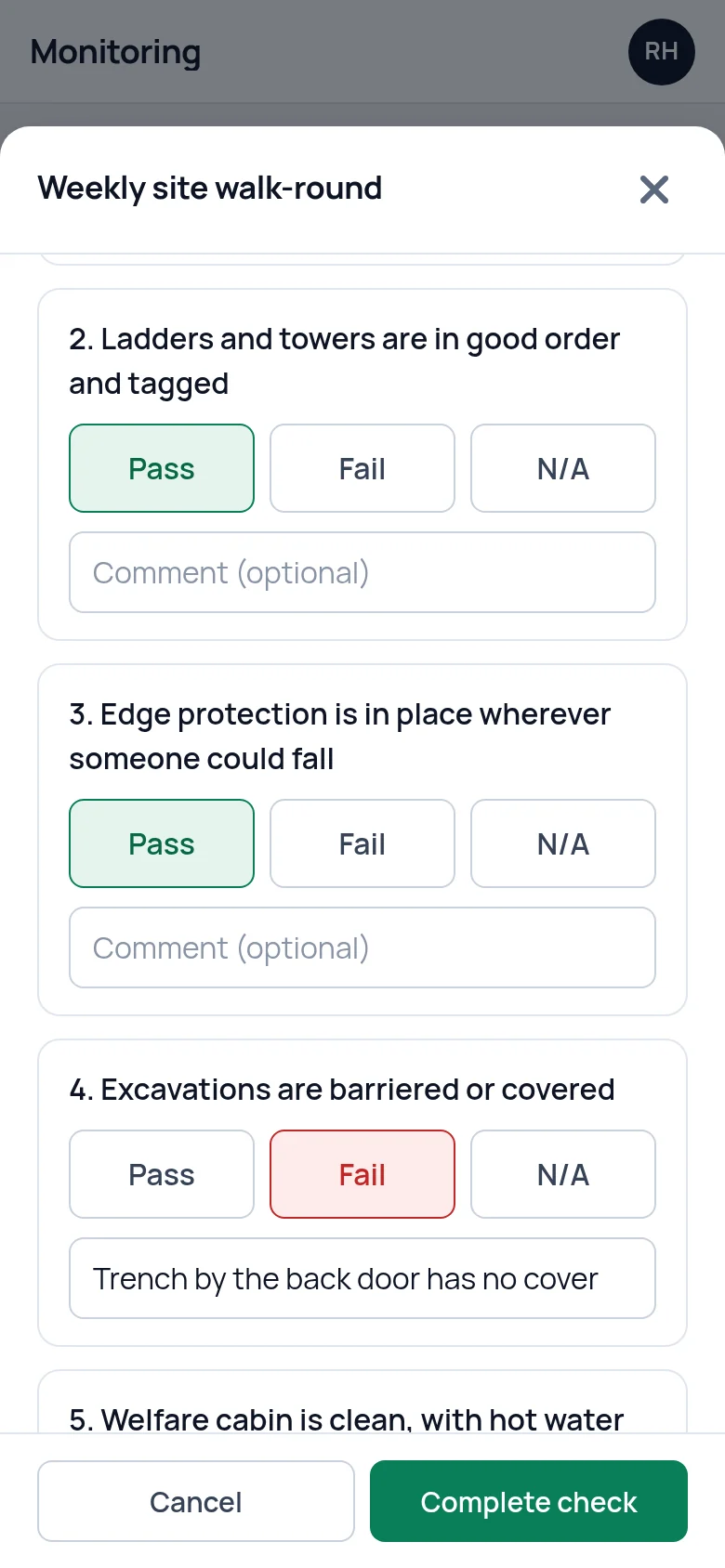
Press Start check on a checklist and the questions open one under another. Yes, No, Pass, Fail and N/A are large buttons you can press with a thumb. A written answer is a single box to type in.
Under every question there is room for a comment. It is optional, and it is where "gauge in the red" or "left-hand mirror cracked" goes. You can choose the site the check was done at, and add notes about the whole check at the end.
A check is saved when you press Complete check, under the name of whoever is logged in. If you close it part way through, the app asks first, because the answers given so far are not kept.
Every question has to be answered
A check cannot be completed with a question skipped. Press Complete check with one missing and the app tells you which, marks it in red and takes you to it. The same rule is applied again when the check is saved, so a record never has a gap in it.
The score is worked out for you. Yes, Pass, N/A and a written answer count as passed. No and Fail count as failed. The score is the passed answers as a percentage of all the answers, so a ten-question check with two Fails scores 80%.
Any check with a No or a Fail in it is counted under "Checks with issues", both on the Monitoring screen and on the dashboard.

A record of each completed check, with every answer
Completed checks are listed under Records, newest first, with the checklist, the date and time, who did it, the score and how many answers passed and failed. The list shows the 50 most recent and can be narrowed to one checklist to find older ones.
Open a record to see each question with the answer given and any comment, followed by the notes. A record is read-only. There is no way to edit a completed check afterwards.
Each record keeps the questions as they were worded on the day. Changing a checklist later does not rewrite the checks already done with it.
Across the top of the Monitoring screen are four figures: checks done, checks this month, the average score and the number of checks with issues.

Archiving a checklist you no longer use
A checklist that has been used cannot be deleted, only archived. It leaves the Checklists tab and can no longer be started or changed. Every check done with it stays in Records, where the checklist is shown as archived.
A checklist that has never been used can be deleted outright, because no record depends on it.
Setting it up
Pick what you already check
Start with the checks you do now on paper or from memory: the forklift, the fire doors, the ladders, the walk-round.
Type in the questions
One line for each thing to look at, with Yes / No, Pass / Fail or a written answer.
Do the first check
Run it on your phone, then open it under Records to see what an inspector would be shown.
What it does not do
- It does not schedule checks or remind anyone. The "how often" on a checklist is a label. Nothing is sent when a check is due, so choose a day and keep to it.
- It does not turn a failed question into an action. If something needs fixing, add it on the Actions screen with a name and a due date.
- It does not take photos or signatures, or export a check as a PDF. Describe a fault in the comment under the question. The record is read on screen.
- It does not work without a connection. The questions load from your account and the check is saved to it, so the phone needs signal or wifi.
Questions people ask
Can I use my own inspection checklists?
Yes. Every checklist is one you build, with your own questions in your own words, and you can change it whenever the job changes. SafetyPro360 does not come with checklists already loaded. Our free checklist guides, such as the forklift daily checklist and the workplace inspection checklist, give you the lines to type in.
What kinds of answer can a question have?
Three: Yes / No, Pass / Fail, or a written answer. Yes / No and Pass / Fail questions also offer N/A when the check is run. Every question has a box for an optional comment as well. There are no number scales, photo answers or signature boxes.
Does it remind us when a check is due?
No. A checklist can be labelled daily, weekly, monthly or as required, but the label does not schedule anything and no email or text is sent. The Records list shows when each checklist was last done, so a missed week is easy to see when you look.
Can a completed check be changed or deleted?
No. A completed check is read-only, and there is no button to edit or delete it. If a checklist has been used it can only be archived, not deleted, so its completed checks stay in Records with every answer and comment as they were given.
Can I use it for a safety audit?
Yes, in the sense that an audit is a longer checklist. Build one with your audit questions and each time you run it the answers, comments and score are kept. It does not weight questions, grade findings or write an audit report for you.
Does it work as an inspection app on a phone?
It runs in the web browser on any phone, with large buttons for each answer, so there is nothing to install. It is not in the App Store or on Google Play, and it needs a connection: it does not work offline.
Have the answer ready before anyone asks.
Add your people, the training each role needs and the documents you hold. From then on, what is overdue or missing is on one screen.
14 days free, then from £9.99 a month, with no card needed to start.