
PPE stock control for a small firm
A stock list of the protective equipment you keep, with a count for each item and the level at which you want to buy more. Items that are running low show themselves.
14 days free, then from £9.99 a month, with no card needed to start.

What you set for each item
An item is whatever you count: safety helmets, cut-resistant gloves in size 9, hi-vis vests. For each one you record:
- a name and, if you want them, a category, a product code and a description
- the number in stock now
- a reorder level: the count at which you want to buy more
- a minimum: the count you never want to drop below
- how many months the item is meant to last before it is replaced, which is shown on the item as a note
Counts and levels are whole numbers. If you hold the same thing in several sizes, add each size as its own item so that each has its own count.
Exactly when an item shows as low or out
There is one rule, and every part of the screen uses it:
- Out of stock: the count is zero.
- Low stock: the count is at or below the reorder level, or at or below the minimum if you have set that higher.
- In stock: the count is above both.
So with a reorder level of 20, an item shows as low at 20, not at 19.
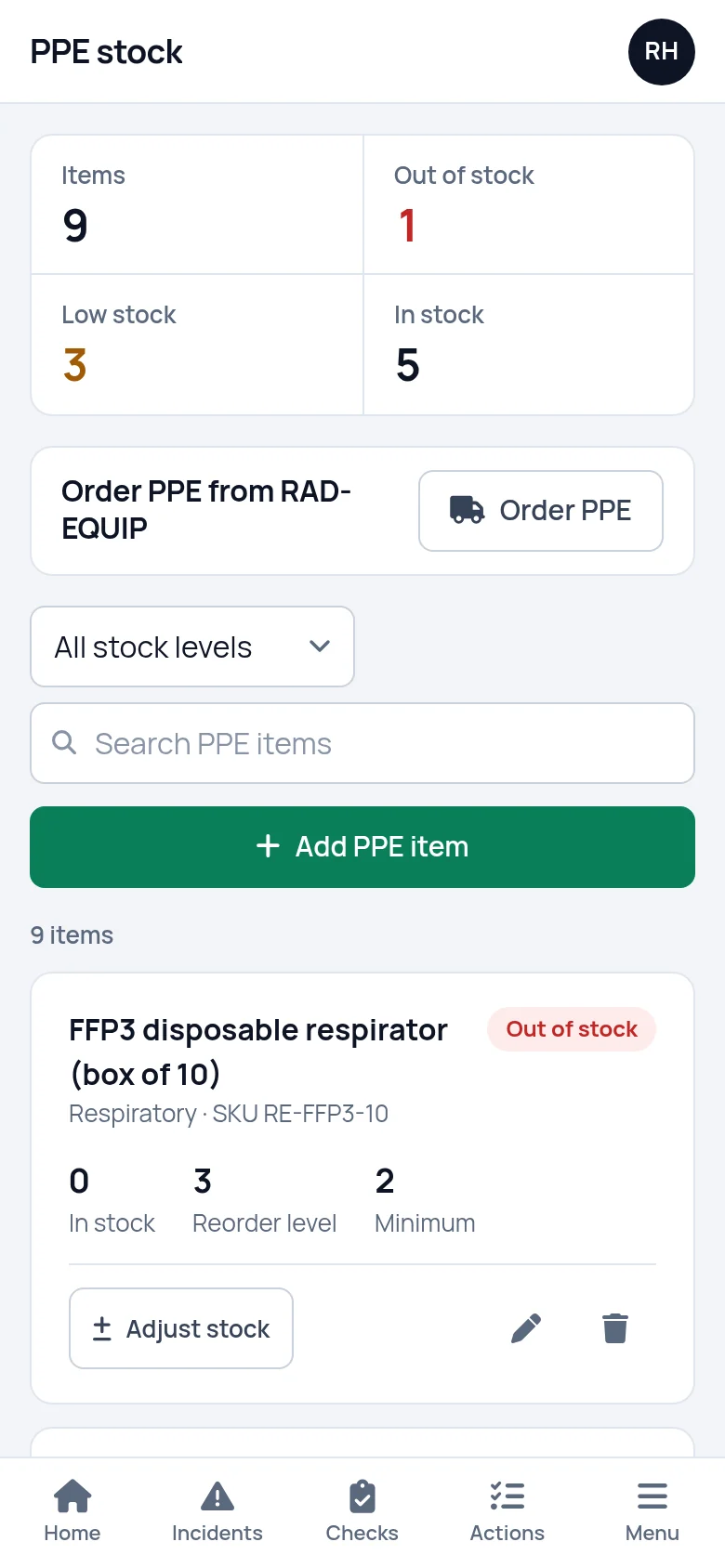
Items that are out come first in the list, then the low ones. The figures at the top count each group and filter the list when you press them, and there is a separate filter for items at or below their minimum. The list can be searched by name, product code or category. Low and out of stock items are also counted on the dashboard.
- Zero is out of stock
- At or below the reorder level is low
- The worst come first in the list
Adjust stock with a reason, and see the history
When a delivery arrives or a box of gloves goes out to site, press Adjust stock on the item. Type the number to add, or a minus number to take stock off, or use the +1, +10, -1 and -10 buttons. The box shows what the count will be before you save, and it will not let you remove more than you hold.
Each change is saved with a reason: stock received, issued to staff, damaged or disposed of, stock count correction, or other.
Under the form are the last five changes to that item. Each one shows the amount, the reason, the date and time, who made it and the count before and after. The count you enter when you first add an item is recorded there as opening stock, and a figure typed over by editing the item is recorded as well.

Order from RAD-EQUIP from the same screen
SafetyPro360 is run by RAD-EQUIP, a PPE supplier, and the PPE screen has an Order PPE button. It opens a list of your items with the low and out of stock ones first, each with a suggested quantity that takes it back above its reorder level. Change any quantity, add a delivery address, a contact and an email address for the invoice, then press Send order.
This is an order request, not a shop. There are no prices on the form and nothing is paid in the app. The order goes to RAD-EQUIP by email with a reference number, and they contact you about delivery and payment.
Sending an order does not change your stock figures. When the delivery arrives, record it with Adjust stock.
You are free to buy your PPE anywhere. The stock list works the same whoever supplies it.

It counts stock, not who was issued what
SafetyPro360 counts how many of each item you hold. It does not record which person was given which item. "Issued to staff" is one of the reasons for taking stock off, and the history shows how many went and when, but not who received them.
If you need an issue record for each person, keep it on paper or in a spreadsheet alongside. Our guide to the PPE register sets out what to record and includes a checklist.
Setting it up
Count what is in the stores
Add an item for each thing you keep, with today's count. Add each size separately.
Set the two levels
Give each item a reorder level and a minimum. Anything already at or below them shows as low straight away.
Adjust as stock moves
Record deliveries in and boxes out as they happen, each with its reason.
What it does not do
- It does not record PPE issued to individuals. It holds stock counts. Keep each person's issue record separately.
- It does not take payment or show prices. An order is an email to RAD-EQUIP, who then contact you about delivery and payment.
- It does not email or text you when stock runs low. Low and out of stock items show on the PPE screen and on the dashboard when you log in.
- It does not track an inspection or expiry date for each piece of kit. The "replace every" figure on an item is a note and nothing counts down to it. Checks on kit such as harnesses can be run as a checklist under inspections and checks.
Questions people ask
Is this a PPE register?
It is half of one. A PPE register usually covers what you hold and who each item was issued to. SafetyPro360 covers the first: a stock list with counts, reorder levels and a history of changes. It does not record issue to named people, so keep that part of your register separately.
Can it track which employee was issued which PPE?
No. You can take stock off with the reason "Issued to staff", and the history shows how many went, when and who recorded it. It does not hold the name of the person who received the item, a size for each person or a signature.
Do we have to buy our PPE from RAD-EQUIP?
No. The Order PPE button is there if you want it, and it sends an order request by email with no payment taken in the app. The stock list, the low stock flags and the history work the same wherever you buy from.
What is the difference between the minimum and the reorder level?
The reorder level is the count at which you want to place an order. The minimum is the count you never want to fall below. An item shows as low stock when it is at or below either one, and there is a filter for the items that have reached their minimum.
Can we update stock from a phone in the stores?
Yes. The PPE screen runs in the phone's browser like the rest of SafetyPro360. Each item has an Adjust stock button with +1, +10, -1 and -10 buttons, so a count can be corrected or a delivery booked in standing at the shelf. It needs a connection.
How far back does the stock history go?
The Adjust stock box shows the five most recent changes to an item, each with the amount, reason, date, time and who made it. Older changes are not shown there. Every adjustment is also written to the account's activity log, which an account admin can read.
Have the answer ready before anyone asks.
Add your people, the training each role needs and the documents you hold. From then on, what is overdue or missing is on one screen.
14 days free, then from £9.99 a month, with no card needed to start.