
Health and safety document management for a small firm
Policies, certificates, insurance and assessments in one register, each with the date it expires and the date it needs looking at again. A second screen lists what you should hold and shows what is missing.
14 days free, then from £9.99 a month, with no card needed to start.

“Is that certificate still in date?”
A customer asking for your insurance, or an auditor asking for your policy
It usually arrives by email with a deadline. Finding the file is half the job. Knowing it has not lapsed is the other half.
What you record when you upload a file
Press Upload document, choose the file and give it a title. The file can be a PDF, a Word or Excel file or an image, up to 25 MB, so a photo of a certificate taken on a phone will do.
Then set as much of the rest as applies:
- Category. The account starts with six: policies, risk assessments, COSHH, method statements, certificates and other. You can add your own and rename them.
- Expiry date, for anything that runs out, such as insurance.
- Review date, for anything you should look at again, such as a policy or a risk assessment.
- Description.
- The requirement it covers, if it is one of the documents your document matrix asks for. Choose one and the title, category and review date are filled in from it.
A category can only be deleted once no document is filed under it.

Current, review due, expired or archived
Every document shows one of four statuses, worked out from today's date each time the screen is opened:
- Current: in date and not due a review.
- Review due: its review date has passed.
- Expired: its expiry date has passed.
- Archived: you have put it away.
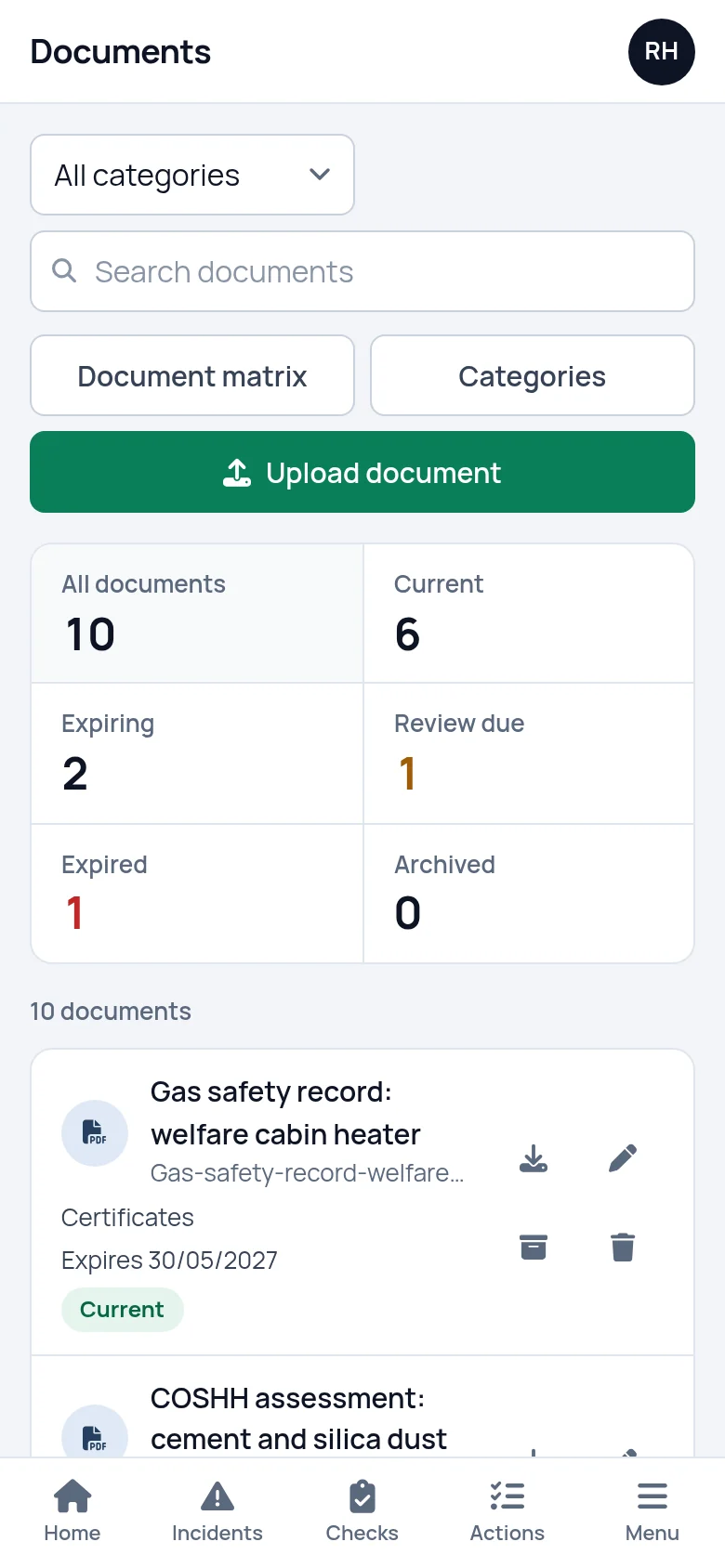
The figures across the top count each status and filter the list when pressed. You can also filter by category and search by title, file name or description.
Expired documents and overdue reviews are counted on the dashboard, with documents that expire in the next two months listed under what is coming up.
Opening a file takes one press. PDFs and images open in the browser. Word and Excel files download. On a phone the register is the same list in a single column, so you can find a certificate and check its status before you send it.
The document matrix: what you should hold
The register shows what you have. The document matrix shows what you ought to have. You list each document the business should hold, such as a fire risk assessment or an insurance certificate, and say how often it should be reviewed: every 6 months, every year, every 2 years or every 3.
Each requirement then shows where it stands:
- Missing: nothing has been uploaded for it.
- Current: its newest document is in date.
- Expiring or Review soon: the document expires within 60 days, or its review falls due within 30.
- Expired or Review overdue: the date has passed.
The figures at the top count the requirements in each state, and pressing one filters the list. From any row you can open the document, upload a replacement, or edit or delete the requirement. Deleting a requirement leaves its document in the register.
You decide what goes on the list. SafetyPro360 does not tell you which documents your business needs. Our guide to the health and safety documents a small firm should hold is a place to start.
- A review period on every requirement
- Missing documents counted on the dashboard

Uploading a replacement when something lapses
When a certificate is renewed, press Upload replacement on its row in the matrix. The title is filled in from the requirement and the next review date is set for you, one review period from today. Add the new expiry date if there is one.
The newest document is the one the matrix counts. The one it replaces stays in the register until you archive or delete it, so you can keep last year's certificate or clear it out.
Archiving takes a document out of the counts without deleting it. It is kept under Archived and can be brought back at any time.
Files are private to your account
An uploaded file cannot be opened by its web address. It is only shown to someone logged in to your account, or to a safety consultant you have connected and given the Documents screen.
Uploads, edits, archiving and deletions are written to the account's activity log.
Setting it up
List what you should hold
Add a requirement for each document the business needs, with how often it is reviewed. Each one starts as missing.
Upload what you have
Press Upload on each row and choose the file. Add the expiry date where there is one.
Work down what is left
Whatever still says missing or expired is your list of things to chase.
What it does not do
- It does not write risk assessments, COSHH assessments or policies. There is no guided form for them. Write them as you do now and upload the finished file.
- It does not keep versions of a document. A replacement is a new document. The old one stays in the register until you archive or delete it, but there is no version history.
- It does not email you before a document expires. What has lapsed, and what is about to, shows on the dashboard and the document matrix when you log in.
- It does not collect signatures. If staff sign to say they have read a policy, keep that sheet and upload a scan of it.
Questions people ask
What types of file can I upload?
PDF, Word (.doc and .docx), Excel (.xls and .xlsx) and images (.jpg, .png and .gif), up to 25 MB each. A phone photo of a certificate is accepted. PDFs and images open in the browser when you press them, and Word and Excel files download to your device.
What is the difference between a review date and an expiry date?
An expiry date is when a document stops being valid, such as the end of an insurance policy. A review date is when you should read it again and confirm it still fits, such as a risk assessment or a policy. A document can have either, both or neither, and each one changes its status when it passes.
Does it tell me which documents my business needs?
No. You build the list yourself on the document matrix, because what a business needs depends on its work, its premises and its customers. Our guide to health and safety documents sets out the records a small firm should hold, and your safety consultant can advise on the rest.
Can it work as a compliance tracker?
In a plain sense, yes. The document matrix tracks whether each document you say you need is present and in date, and the dashboard counts what is missing, expired or overdue for review. It does not judge whether your business is compliant. It shows the gaps in the records.
Can I keep risk assessments and COSHH assessments in it?
Yes, as files. Upload each assessment with a review date and it will show as review due when that date passes. SafetyPro360 does not have a form that writes the assessment for you, so the document itself is produced the way you produce it now.
Who can open our documents?
People logged in to your account, and a consultant if you have connected one and given them the Documents screen. A file cannot be reached by its web address alone. Uploads, edits, archiving and deletions are recorded in the activity log, which an account admin can read.
Have the answer ready before anyone asks.
Add your people, the training each role needs and the documents you hold. From then on, what is overdue or missing is on one screen.
14 days free, then from £9.99 a month, with no card needed to start.